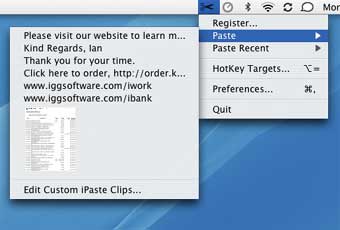
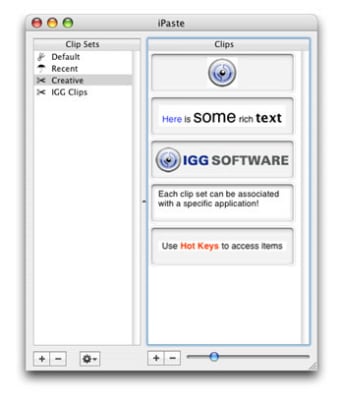
iPaste works by organizing any copied material in clip sets. Thanks to the + and - buttons at the bottom of the interface, you create clip sets for virtually anything, and quickly add or remove clips.
iPaste lets you copy any sort of file, like text, images, media or PDF. Accessing hotkey targets from the drop down menu brings all your clippings to the front of your screen.
iPaste gives you two viewing options: from the menu bar and from the Dock. While the first one is more discreet it also feels more limited.
We felt best to keep the application in the Dock to copy and view new items. Another advantage is the little sliding bar, which lets you zoom in onto clipped items.
The main feature which truly makes iPaste a time saving application are the hotkeys. Using the CTRL + Option + Number combination, iPaste lets you copy and paste quickly.
Another handy little function is being able to go back in time and check what items you've clipped in iPaste.
All in all, iPaste will make copying and pasting much more easier for you.
iPaste keeps frequently used phrases and images a keystroke away. iPaste is a tool to make clippings (e. g. pieces of text, images, PDFs, etc. ) that you commonly paste into applications easily accessible via HotKeys and a contextual menu.
Small Footprint
We all know that Dock space can be precious, with iPaste you can choose to not show the application in the Dock.
Furthermore, add it to your login items (by going to System Preferences>Accounts) and then it will become an integrated background utility that you won't even know is running, except that you will be able to harness its power.
Rich Text, Images and More
iPaste supports many different types of data so that you easily manage a slew of recently copied items or frequently used items including: plain text, rich text, TIFF, PDF, PICT, JPEG, GIF and more.
Floating Palette
Quickly and easily access your clips and clip sets.
Multiple Clip Sets
Create unlimited clip sets each of which can hold unlimited numbers of clips.
All of these at your finger tips results in increased productivity.
Link Clip Sets to Applications
Set which clip sets you want to use for which applications.
When that application is brought to the front, so are the associated clips in the floating panel.
Memory Lane
iPaste keeps track of the items that you copy in other applications and makes this available to you via a contextual menu and/or a system wide menu.
HotKeys
There is no faster way to get what you want on the screen than by pressing a few keys. Sure control-clicking the mouse can be handy, but using keys is still faster.
Laws concerning the use of this software vary from country to country. We do not encourage or condone the use of this program if it is in violation of these laws. Softonic may receive a referral fee if you click or buy any of the products featured here.